
It’s no secret that the backlinks pointing to your site are of immense importance especially when it comes to your rankings, and how much trust Google has in your site.
Relevant links on high DA sites can boost your ranking , however bad backlinks can negatively impact your SEO.
It is recommended to do an audit of your backlink profile on regular intervals do so that you can spot any potential problems before they become unmanageable.
Although submitting a disavow file is a simple process, even a small mistake in the process can have repercussions.
I have listed out a simple 5 step process using which you can simply get rid of bad backlinks
Step 1: Download Your Backlink Profile
In order to disavow bad links, the prime requisite is their availability You can use number of tools
To download your backlink report:
- Majestic(Paid)
- Ahrefs(Free/Paid)
- Moz Open Site Explorer
- Google Search Console: It is a free option, but it won’t report all of your backlinks(Free)
You can download this report in spreadsheet format for ease
Step 2: Conduct a Backlink Audit
Once you have your backlink profile, the next step is to conduct the audit. The basic principle here is to identify low rated/spammy sites which link to yours.
There are a number of characteristics that define a bad link, including:
- Links from low-quality,unrelated, and/or insecure websites
- Links from untrustworthy/spammy websites, forum posts etc
- Links from inactive/outdated article or link directories
- Links from sponsored content such as paid blogs,advertising, etc.)
- Links from blogging networks, link farms, and other circular link-building networks
- Too many links with same anchor text
As you go through your backlinks report, highlight the ones that you have identified as irrelevant ones.
Step 3: Create a Disavow File
Before proceeding, it is advisable that you should always make an attempt to contact sites first to request the removal of a link.
This is however not always possible, and if you do contact the site and receive no response from their side, the last resort would be to disavow the link.
Disavow file:
A disavow file is simply a list of domains that you submit to Google through your Search Console account, which signifies that you wish for these backlinks to be ignored.
Finally, Google will not take these links into account when determining your site’s authority and rankings.
On nutshell, they’ll have no effect in the performance of your site Also, it is highly recommended that you should always disavow links at domain level to ensure that Google ignores all links from that site.
For example: If we want to get rid of the links from few of the sites,Just mentioning one link instead of domain is a wrong way of doing it, as shown below
Bad example:
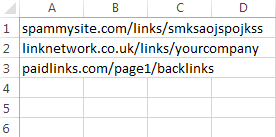
Good example

Your disavow file has to be in .txt format. To create a text file, copy the column B from your spreadsheet and paste it into either:
- TextEdit on a Mac
- Notepad on Windows
Save this file somewhere under a suitable name
Step 4: Submit Your Disavow File
To submit your disavow file, you need to login to your Search Console account to access Google’s Disavow Tool.
Do not have a Google Search Console account? Check out our guide to Google Search Console here.
When you’ve logged in, select your site property from the drop-down menu as shown below in the image.
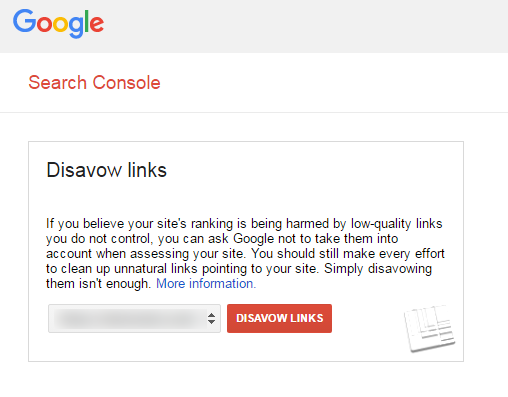
Click ‘Disavow Links’. You will see a warning message from Google similar to the one at the beginning of this post. To continue, click ‘Disavow Links’ again.
Follow below steps to submit a disavow list:
- Click ‘Choose File’
- Find your .txt disavow file you created earlier
- Upload this and click ‘Submit’
Step 5: How to Update a Disavow File:
To update your disavow file, you need to add the new links you have identified to the previous Disavow File.
If you Simply upload your new list, it will mean that only these domains will be ignored by Google, and none of the domains previously identified will be disavowed.
You will see the below specified box, containing your previous disavow file:
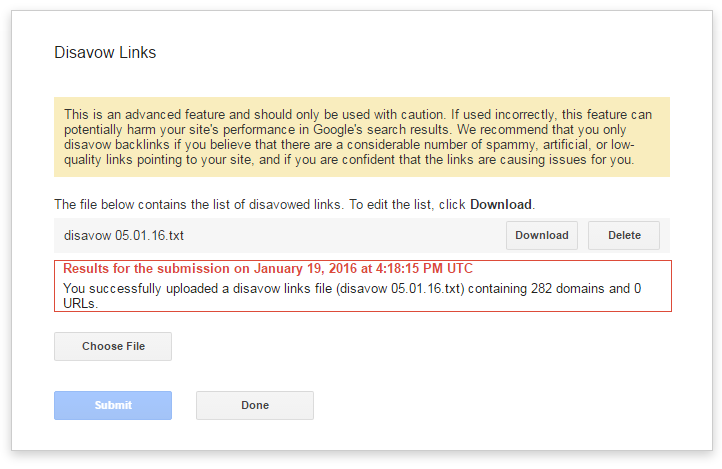
- Click ‘Download’ to download a copy of your previous disavow file
- Add your new domains to this file by copying and pasting
- Save your new and updated disavow file as a .txt file
- Click ‘Choose File’ back on the Disavow Tool
- Find your new disavow file
- Upload this and click ‘Submit’
A red ‘Results’ box will appear and you will see a message from Google stating that you have successfully submitted your disavow file with zero errors 🙂
You’ll also get a message from Google in the Messages section of your Google Search Console account.
Now, the next time when Google crawls your website, your disavow file will be taken into account and these links will not be assessed as part of your backlink profile 🙂

About the author: Vibhav Gaur, Business Head
Vibhav Gaur leads strategic operations and business growth at the organization. With a strong background in digital transformation and customer-focused solutions, he has helped numerous clients streamline their web presence and scale efficiently. His leadership ensures seamless execution across teams, with a commitment to delivering results and fostering innovation in every project.


